
SPIFFs
A SPIFF (Sales Performance Incentive Fund) is a short-term, targeted cash bonus you pay partners on top of their standard commissions — the tool for running a quarterly push, a product launch incentive, or a “bring us three deals this month” campaign. In PartnerPortal, a SPIFF is a campaign you create, invite specific partners to, and award manually when a partner meets the criteria you set.
How SPIFFs Work
Section titled “How SPIFFs Work”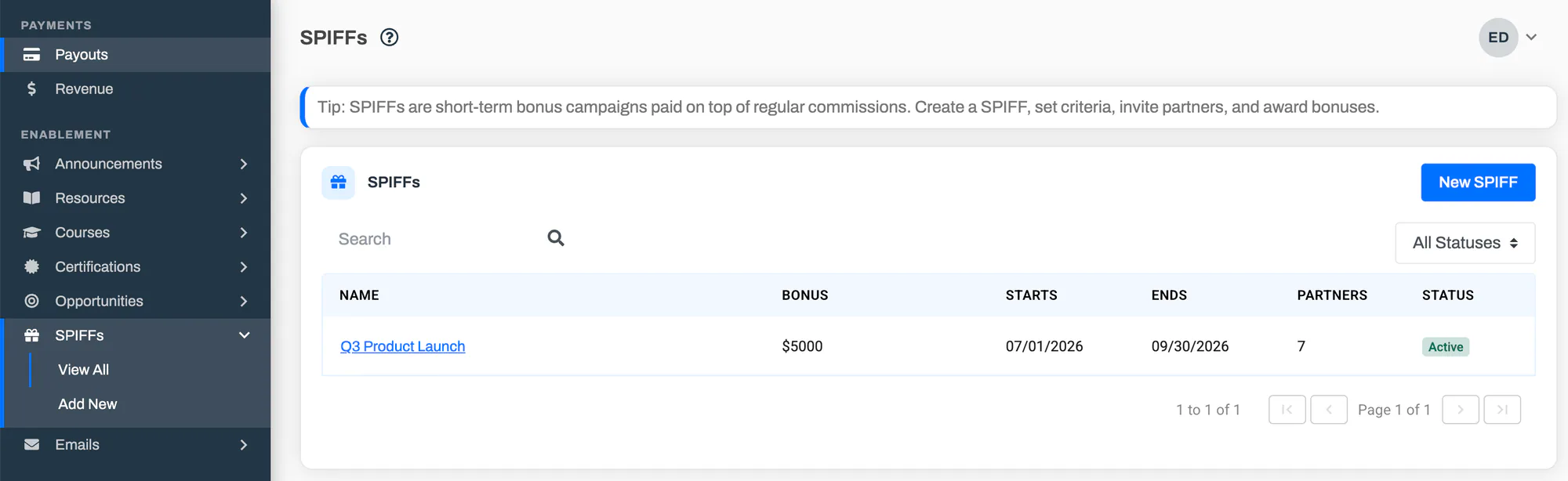
A SPIFF is a campaign with a name, a start and end date, a bonus amount, a plain-English description of how partners qualify, and a list of invited partners. You run it in four moves: create it, invite the right partners, publish it so they can see it, and award the bonus when someone qualifies.
PartnerPortal does not decide who earned a SPIFF for you. You write out how to qualify in your own words, you decide when a partner has met it, and you record the award with one click. This keeps SPIFFs flexible enough to cover any incentive you can describe — new logos, certifications, event attendance, vertical pushes — without being limited to what the portal can measure automatically.
Awards are recorded as payments, so a SPIFF bonus flows into the same places a commission does: the partner’s earnings, your Payments list, and your accounting exports. A SPIFF bonus never affects revenue or commission math — it’s a flat bonus that stacks on top.
The SPIFF lifecycle
Section titled “The SPIFF lifecycle”Every SPIFF moves through three states:
- Draft — you’re still setting it up. Only you can see it; partners can’t, and no awards or comments are possible yet. You can invite partners while drafting, but they won’t be notified until you publish.
- Active — the SPIFF is live. Invited partners can see it, you can award bonuses, and the comment threads are open.
- Ended — the campaign is over. Partners keep read access to the SPIFF and its history, but comments close and no new partners can be invited. You can still record a late award if you discover after the fact that a partner qualified.
Create a SPIFF
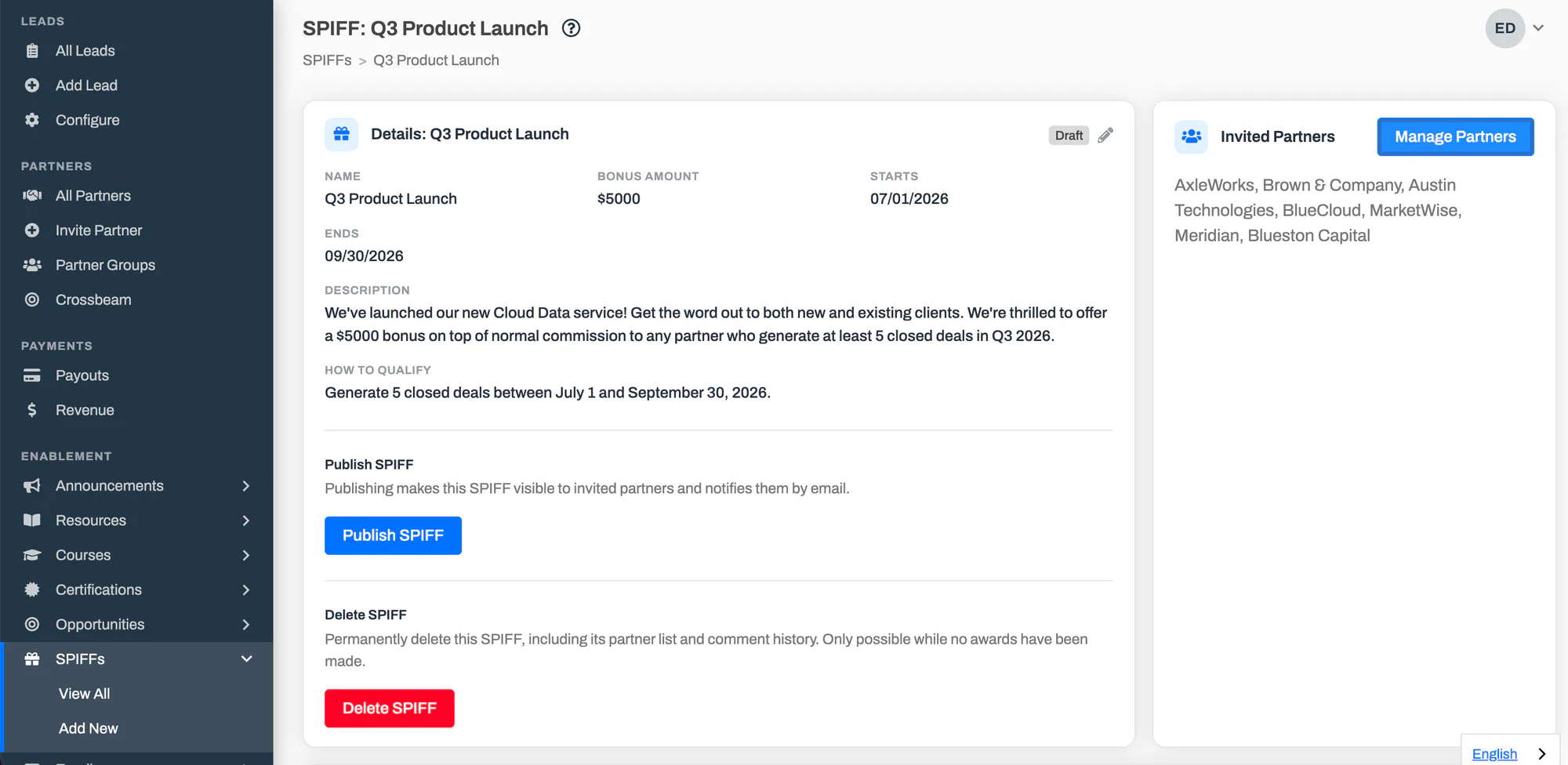
Section titled “Create a SPIFF”Go to SPIFFs in the main menu and select Add New.
Fill in the campaign details:
- Name — what partners will see this SPIFF called.
- Bonus Amount — the flat cash bonus, in your portal’s currency.
- Starts and Ends — the campaign window.
- Description — an optional overview of the campaign.
- How to Qualify — the criteria a partner has to meet to earn the bonus, in plain language. This is shown to invited partners, so be specific (for example, “Close any new-logo deal of $10,000 or more before March 31”).
Select Save. The SPIFF is created as a draft — not yet visible to partners.
Invite Partners
Section titled “Invite Partners”You invite partners after the SPIFF is created, from its detail page.
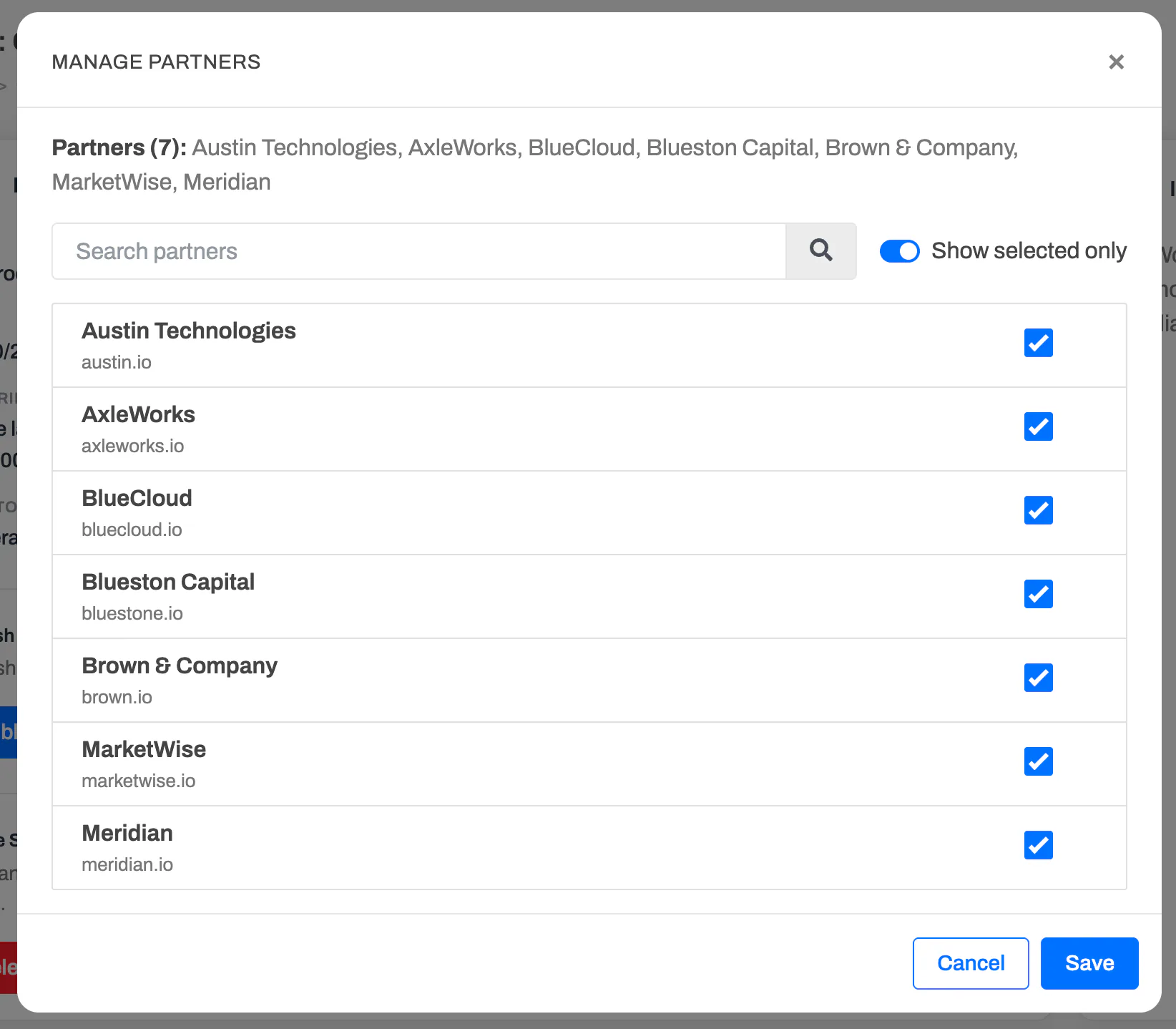
Open the SPIFF and, in the Invited Partners card, select Manage Partners.
Search for and check the partners you want to include, then save. You can come back and add or remove partners at any time while the SPIFF is a draft or active.
A SPIFF is private to the partners you invite — each one only ever sees the SPIFFs they’ve been invited to, and never the other invited partners.
Publish a SPIFF
Section titled “Publish a SPIFF”Publishing takes a SPIFF from draft to active. Until you publish, invited partners can’t see the SPIFF at all.
Open the SPIFF and select Publish SPIFF, then confirm.
Every invited partner is notified by email and can now log in to see the SPIFF, its criteria, and their comment thread with you.
Partners you invite after publishing are emailed as soon as you add them.
Award a Bonus
Section titled “Award a Bonus”When a partner meets the criteria, you record the bonus as an award. An award is a payment, so it immediately shows up in that partner’s earnings, your Payments list, and your accounting exports.
Award from the SPIFF
Section titled “Award from the SPIFF”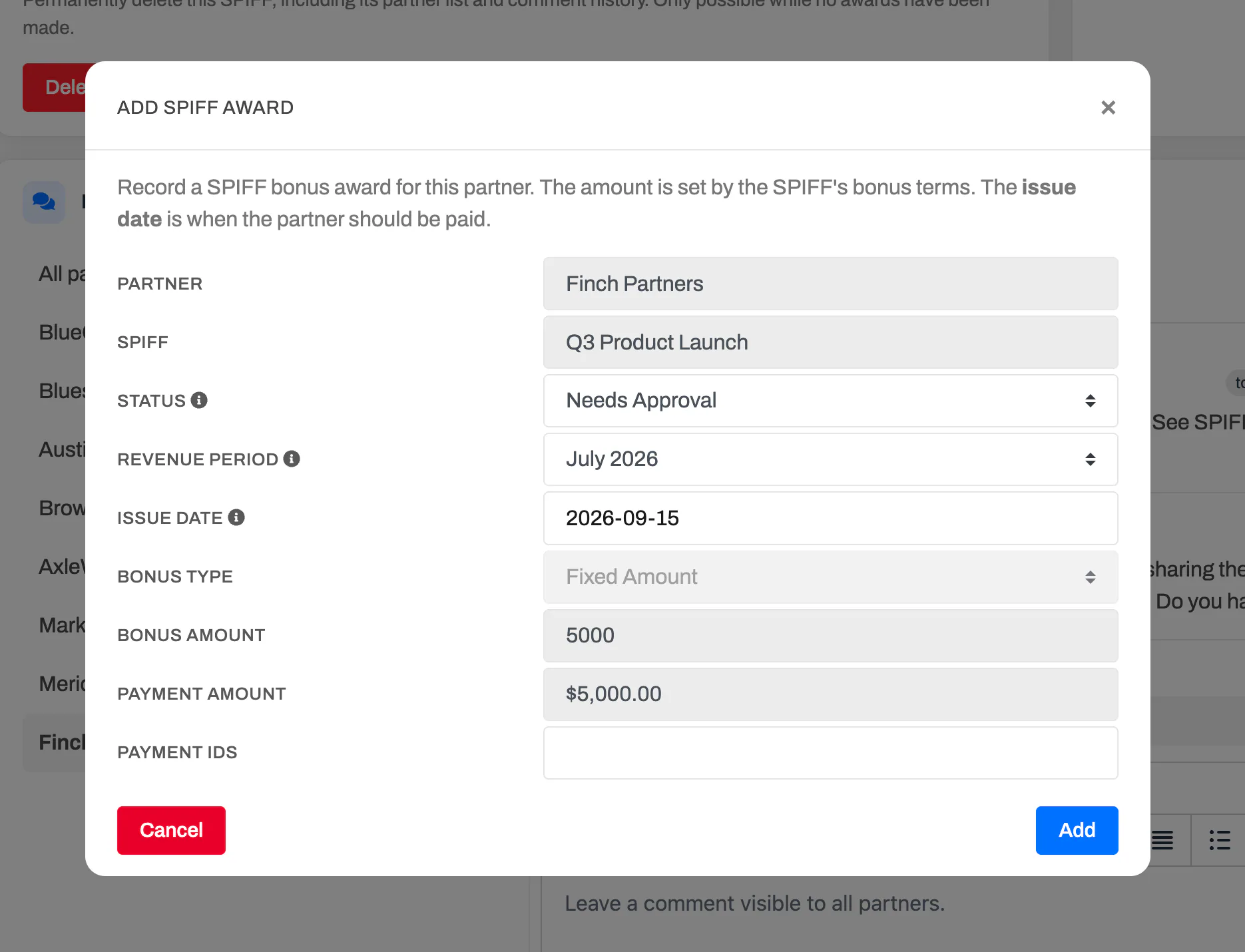
Open the SPIFF and, in the Partners & Comments section, select the partner in the list on the left.
Select Add Award. The bonus amount is pre-filled from the SPIFF, and the partner is already set.
Optionally tie the award to a specific lead, then confirm. The award appears in that partner’s awards, and the partner’s running total updates.
Award from a lead
Section titled “Award from a lead”If you’re already looking at a lead, you can record a SPIFF award there instead. Open the lead’s Add Payment window and use the Apply SPIFF option to pick one of the active SPIFFs that lead’s partner is invited to — the amount and campaign fill in automatically.
Where awards show up
Section titled “Where awards show up”- On the SPIFF, each partner shows a running awards total, and an All Awards section lists every award across the campaign.
- On the partner’s side, they see only their own awards under the SPIFF.
- In your Payments list and accounting export, SPIFF awards are labeled with a Source of “SPIFF Award” and the campaign name, so they’re easy to tell apart from commissions and filter on.
Comment with Partners
Section titled “Comment with Partners”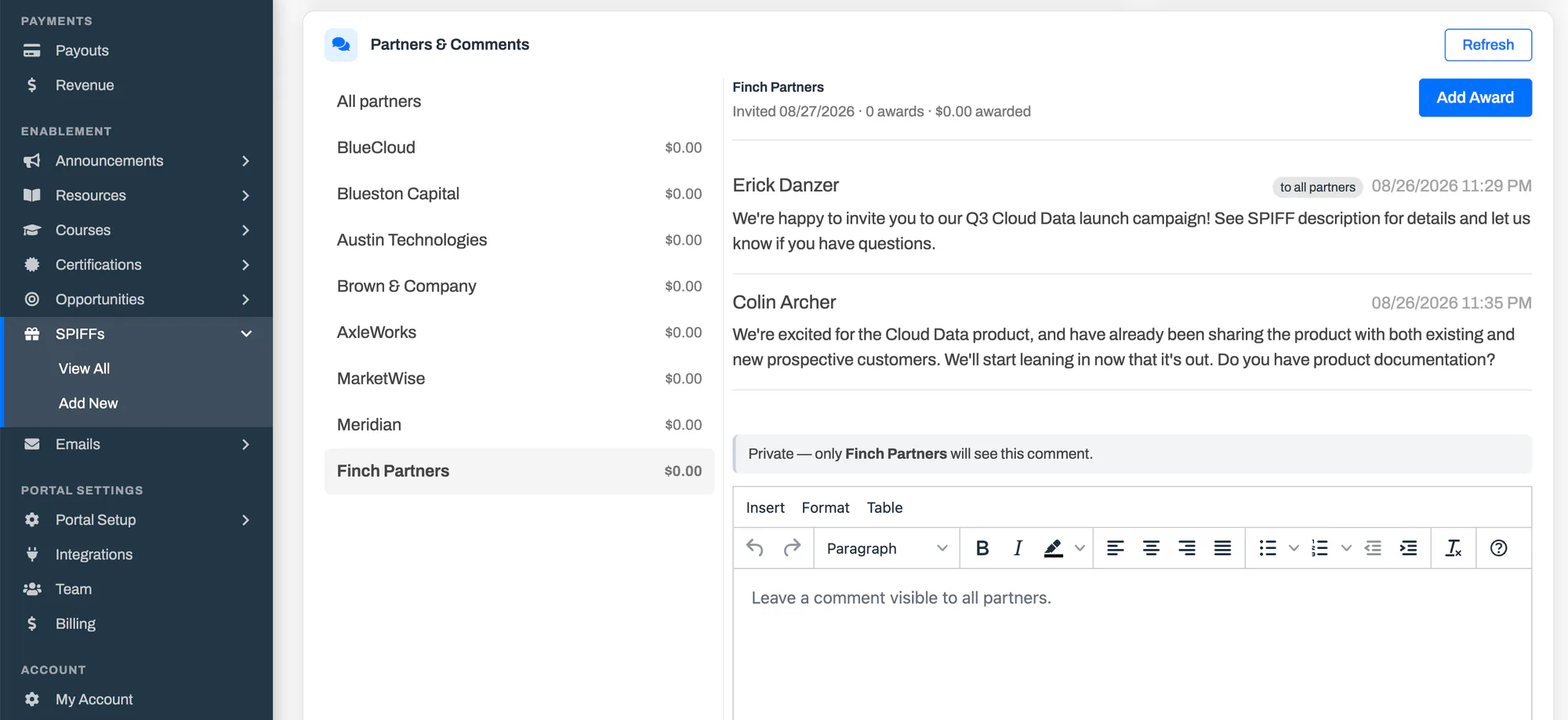
The Partners & Comments section on a SPIFF works the same way as it does on an opportunity. Every invited partner gets their own private thread — a one-on-one conversation only you and that partner (and their team) can see.
- Choose who you’re talking to. The list on the left shows every invited partner. Select a partner to open their private conversation, or select All partners to post a single comment every invited partner can see.
- Know who will see it. Before you post, a banner confirms whether the comment is private to one partner or visible to everyone on the SPIFF.
- Stay up to date. Select Refresh to pull in new replies without reloading the page.
Comments are open while a SPIFF is active. Once it ends, existing threads stay readable but no new comments can be added.
End or Delete a SPIFF
Section titled “End or Delete a SPIFF”Ending a SPIFF closes out the campaign. Partners keep read access to the SPIFF and their awards, comments close, and no new partners can be invited — but you can still record a late award if a partner turns out to have qualified.
- Open the SPIFF and select End SPIFF, then confirm.
Deleting removes a SPIFF completely, along with its partner list and comment history. You can only delete a SPIFF that has no awards — once you’ve paid a bonus under it, end it instead so the financial record stays intact.
What Partners See
Section titled “What Partners See”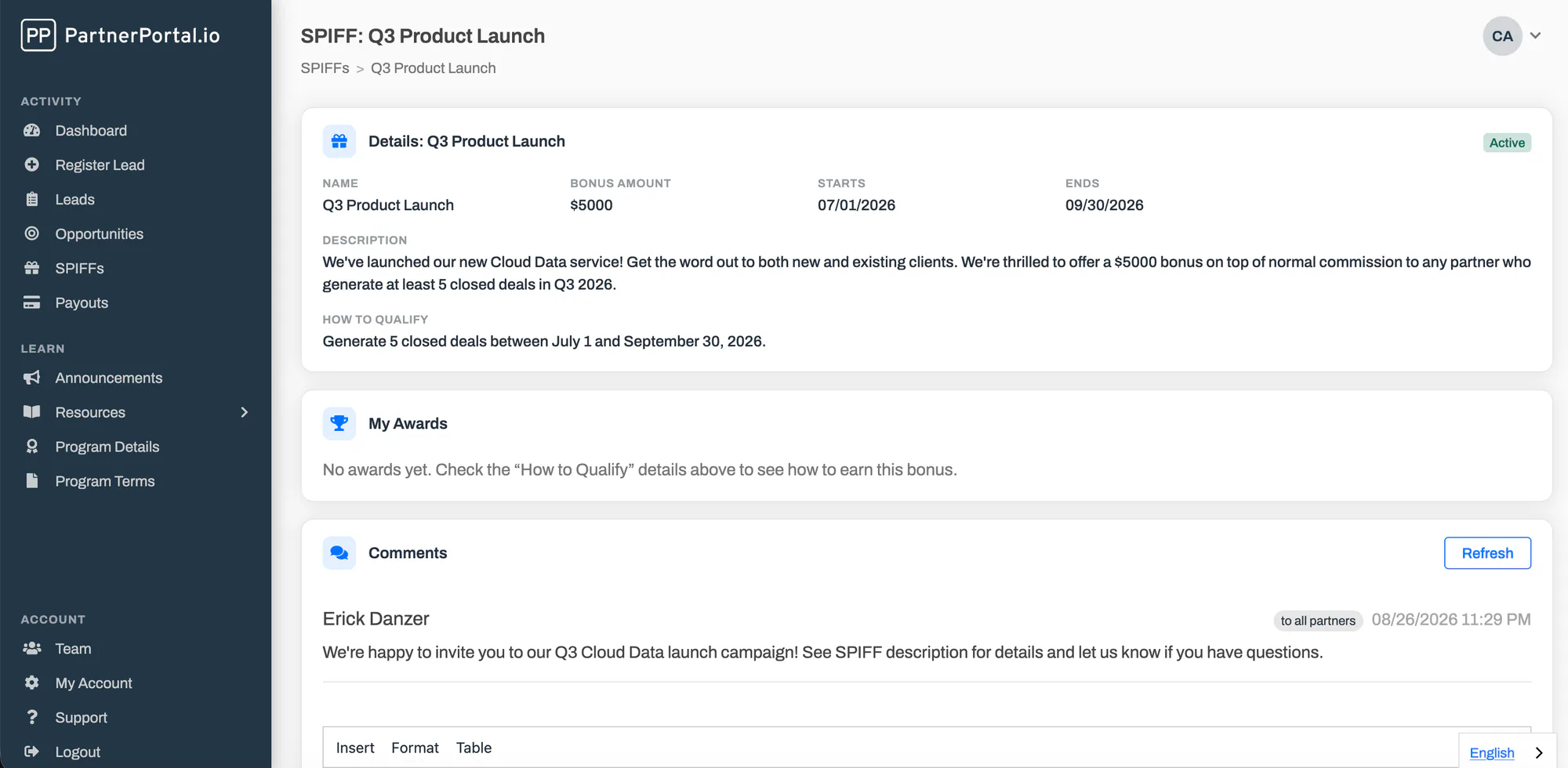
Invited partners get a SPIFFs area of their own listing every SPIFF you’ve invited them to. Opening one shows the campaign details, the How to Qualify criteria, their own awards under it, and their private comment thread with you. Partners only ever see their own awards and their own conversation — never another partner’s.
Frequently Asked Questions
Section titled “Frequently Asked Questions”How is a SPIFF different from a commission?
Section titled “How is a SPIFF different from a commission?”A commission is the standard payout tied to a partner’s deals. A SPIFF is a separate, time-bound bonus campaign that pays on top of commissions — it stacks, so a single deal can earn both. SPIFFs are always flat cash bonuses you award by hand.
Do SPIFFs pay out automatically?
Section titled “Do SPIFFs pay out automatically?”No. You describe how partners qualify, decide when someone has met the criteria, and record the award yourself. This is deliberate — it lets a SPIFF reward anything you can verify, not just what the portal measures.
Can I change the bonus amount after partners are invited?
Section titled “Can I change the bonus amount after partners are invited?”Yes. Editing the bonus amount changes what future awards default to. Awards you’ve already made keep the amount they were recorded at, so your history stays accurate.
What happens to a partner’s awards if I remove them from a SPIFF?
Section titled “What happens to a partner’s awards if I remove them from a SPIFF?”Any awards already made to that partner stay on the record — they’re payments and are never removed. Removing the partner takes the SPIFF (and your comment thread with them) out of their view and stops any new awards.
Can I award a bonus after a SPIFF has ended?
Section titled “Can I award a bonus after a SPIFF has ended?”Yes. Ended SPIFFs still accept awards so you can handle the “the campaign closed, but I just realized this partner qualified” case. You’ll confirm the late award when you add it.
Who can manage SPIFFs?
Section titled “Who can manage SPIFFs?”SPIFFs use the same permissions as Opportunities — anyone on your team who can manage opportunities can create and run SPIFFs, with no extra setup.